
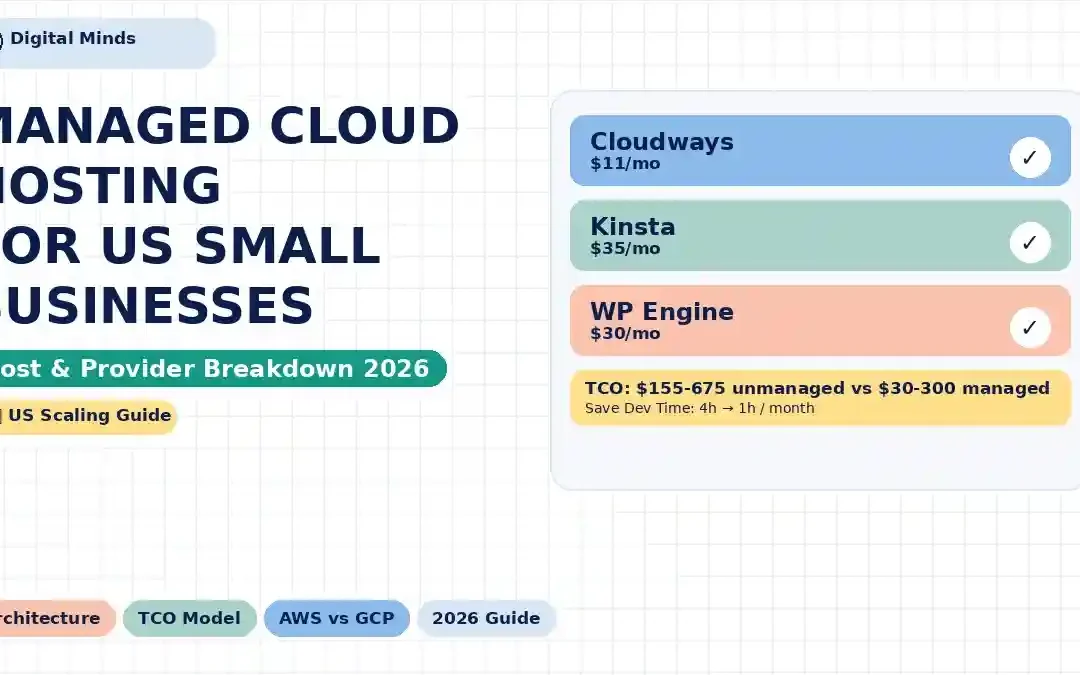
Managed Cloud Hosting for Scaling US Small Businesses: Architecture, Cost, and Provider Breakdown
Growing a US small business website can create an uncomfortable hosting problem: the cheap server that worked at 10,000 visits may become unreliable at 100,000, while moving directly to AWS or Google Cloud can introduce an entirely new layer of infrastructure work.
Managed cloud hosting sits between those two extremes. You still get cloud infrastructure and room to scale, but the hosting provider handles much of the operating-system, security, caching, backup, monitoring, WordPress and infrastructure management that would otherwise fall on your team.
What Is Managed Cloud Hosting?
Managed cloud hosting combines cloud infrastructure with a service layer that handles many routine infrastructure responsibilities for you.
In an unmanaged environment, renting a virtual machine is only the beginning. Your business may still need to configure the operating system, web server, PHP runtime, database, firewall, backups, monitoring, SSL, caching, deployment processes and recovery procedures.
A managed platform takes responsibility for some or many of those layers. The exact boundary depends on the provider and plan, so "managed" should never be treated as a universal technical specification.
| Layer | Unmanaged Cloud VM | Managed Cloud Platform |
|---|---|---|
| Compute | You select and manage the VM or compute resources. | Provider exposes simplified plans or managed resources. |
| Operating system | Usually your responsibility. | Usually maintained or abstracted by the platform. |
| Web server | Configuration and tuning are your responsibility. | Often preconfigured and optimized. |
| WordPress/PHP stack | You manage versions, tuning and compatibility. | Platform provides a managed WordPress environment. |
| Backups | You normally design and configure them. | Usually included according to plan and retention rules. |
| Security | You assemble firewall, WAF, patching and monitoring layers. | More security controls are packaged into the platform. |
| Support | Infrastructure support is often limited to the cloud provider. | Managed hosting support can include platform-level assistance. |
That distinction matters because a business owner is not only buying CPU, RAM and storage. They are also buying a way to operate the website.
A Practical Managed Cloud Architecture for a Growing US Business
A typical high-growth WordPress business does not need a complicated multi-region architecture on day one. A sensible progression is to add layers only when traffic, revenue, risk or compliance requirements justify them.
| Layer | Typical Role | Why It Matters |
|---|---|---|
| DNS | Routes visitors to the website | Controls domain traffic and failover paths. |
| CDN / Edge | Serves cached content closer to visitors | Can reduce origin load and improve delivery speed. |
| WAF | Filters malicious web traffic | Provides an additional security layer before requests reach WordPress. |
| Application server | Runs WordPress and PHP | Core application workload. |
| Object/page cache | Reduces repeated application work | Helps WordPress handle repeated requests more efficiently. |
| Database | Stores WordPress content and settings | Often becomes a bottleneck as applications become more complex. |
| Backup | Provides recovery capability | Protects against accidental deletion, bad updates and other failures. |
| Monitoring | Tracks availability and performance | Helps identify problems before they become business-critical. |
For a US-focused audience, geographic placement also matters. A company whose customers are primarily in the United States might consider infrastructure close to major US population centers, such as US-East/Northern Virginia or US-West/Oregon, while businesses serving UK customers may consider London and European audiences may benefit from a Frankfurt-region deployment.
Geographic proximity is not the only performance factor. CDN behavior, caching, database latency, application code and third-party services can all influence real-world response time.
If you are still deciding between shared, VPS and cloud hosting, see our detailed guide: Small Business Web Hosting: Shared vs VPS vs Cloud .
AWS vs Google Cloud: Why "Cheap Cloud" Can Become Expensive
AWS and Google Cloud are infrastructure platforms rather than simple WordPress hosting dashboards. They can provide tremendous flexibility, but the business must decide how much of the architecture it wants to own.
AWS itself describes its Well-Architected approach around operational excellence, security, reliability, performance efficiency, cost optimization and sustainability. Google Cloud similarly organizes its framework around operational excellence, security, reliability, cost, performance and sustainability.
That is a useful reminder: running a cloud workload is broader than renting a server.
Read the official AWS Well-Architected Framework and Google Cloud Well-Architected Framework documentation before designing a production architecture.
What You May Need to Manage on an Unmanaged Cloud VM
- Linux and package updates
- NGINX or Apache configuration
- PHP versions and PHP-FPM tuning
- MySQL or MariaDB configuration
- SSL certificate automation
- Firewall rules
- WAF configuration
- Backup scheduling and restore testing
- Log management
- Monitoring and alerting
- Security hardening
- Incident response
- Scaling procedures
- Staging and deployment workflows
None of these tasks are inherently bad. In fact, businesses with internal DevOps or engineering teams may want this level of control. The question is whether the organization wants to spend engineering time operating the infrastructure.
Ask instead: "What will this hosting architecture cost us after infrastructure, support, security, maintenance and engineering time are included?"
Total Cost of Ownership: Managed vs Unmanaged Cloud
Hosting price and hosting TCO are not the same thing.
The following model illustrates the difference for a hypothetical US small business running a production WordPress site. The unmanaged figures are deliberately presented as estimates because AWS and Google Cloud costs vary by machine type, region, storage, bandwidth, backups, monitoring, discounts and architecture.
The labor assumptions are also illustrative. Replace them with your own internal engineering or agency rate for a more accurate business case.
| Monthly TCO Component | Unmanaged AWS/GCP Example | Managed Cloud Example |
|---|---|---|
| Infrastructure | $40–$100+ | $30–$100+ |
| Backups / storage | $5–$25+ | Often included or packaged |
| Monitoring / security services | $10–$50+ | Often included at platform level |
| Technical administration | $100–$500+ | Lower internal workload |
| Incident response | Business responsibility | Provider support varies by plan |
| Illustrative monthly TCO | $155–$675+ | $30–$300+ |
Important: This table is a planning model, not a vendor quotation. Actual infrastructure and labor costs can be materially different.
Example Annual TCO Model
Consider two small businesses with similar traffic. Business A has an internal technical resource that spends around four hours per month on hosting administration. Business B uses a managed platform and spends approximately one hour per month on hosting administration.
At a hypothetical internal cost of $100 per technical hour, the difference can quickly become more significant than the underlying server price.
| Cost Category | Unmanaged Model | Managed Model |
|---|---|---|
| Infrastructure + services | $90/month | $70/month |
| Estimated admin time | 4 hours/month | 1 hour/month |
| Illustrative labor cost | $400/month | $100/month |
| Illustrative monthly TCO | $490 | $170 |
| Illustrative annual TCO | $5,880 | $2,040 |
This is a hypothetical TCO scenario designed to demonstrate the accounting principle. It is not a claim that every managed platform will cost less than AWS or GCP.
Cloudways vs Kinsta vs WP Engine
These platforms do not offer identical products. They overlap around managed WordPress hosting, but their positioning, infrastructure models, pricing and operational features differ.
| Provider | Published Entry Pricing* | Best Fit | Management Model | Scaling Approach |
|---|---|---|---|---|
| Cloudways | From around $11/month on current published offers; plan/provider dependent | Businesses and agencies wanting managed cloud infrastructure choices | Managed layer over supported cloud infrastructure | Vertical scaling and different underlying cloud providers |
| Kinsta | $35/month for the published entry Business/Launch plan | Businesses prioritizing managed WordPress operations | Managed WordPress platform | Higher plans, resources and infrastructure options |
| WP Engine | Starting around $30/month according to current platform information | Managed WordPress businesses and growing organizations | Managed WordPress platform | Plan-based scaling and higher-capacity offerings |
*Published pricing can change, and promotions, billing cycles, usage limits, taxes and add-ons can affect the final bill. Always verify pricing before purchase.
Cloudways
Cloudways is useful for businesses that want a managed control layer while retaining choices around underlying cloud infrastructure. Its current platform lists managed options across cloud providers and uses a pay-as-you-go billing approach. Its published features include free migration, staging and cloning capabilities, a firewall, Redis and other platform tools, depending on the plan.
This can be attractive for agencies that manage multiple client sites and want more cloud flexibility without building the entire server-management stack themselves.
Our previous Cloudways performance coverage can also provide useful context: Cloudways vs Hostinger Cloud Speed: TTFB Test .
Kinsta
Kinsta focuses heavily on managed WordPress. Its current published plans include managed security features, CDN bandwidth, backups, staging and expert support. The provider also documents isolated containers for sites and infrastructure distributed across multiple data centers.
Its published entry Business pricing currently starts at $35/month on the monthly billing option, with annual billing offering a lower effective monthly rate. Higher plans increase the number of WordPress installs, traffic allowances, storage and bandwidth.
WP Engine
WP Engine is another managed WordPress-focused platform. Its current platform information describes managed performance, security and technical support, with entry-level plans starting around $30/month and higher capacity options for larger workloads.
For agencies, businesses and teams that want WordPress-specific operational tooling rather than a general-purpose VM, this model can reduce the amount of infrastructure administration required internally.
Provider Feature Comparison
| Feature | Cloudways | Kinsta | WP Engine | Raw AWS/GCP |
|---|---|---|---|---|
| Managed WordPress focus | Yes | Yes | Yes | No |
| Cloud infrastructure choice | High | Platform controlled | Platform controlled | Very high |
| Server administration | Reduced | Reduced | Reduced | Customer responsibility |
| WordPress-specific support | Yes | Strong focus | Strong focus | Not inherently included |
| Architecture flexibility | Medium–High | Medium | Medium | Very high |
| Operational complexity | Lower | Lower | Lower | Higher |
What Does Managed Cloud Hosting Actually Save You?
The most important benefit is not necessarily a faster server. It is reduced operational overhead.
Imagine a marketing agency launching five WordPress websites for clients. With unmanaged infrastructure, every site may add another combination of plugin compatibility, PHP versions, backups, security settings, staging, deployment and troubleshooting.
A managed platform can standardize much of that workflow.
That is particularly useful when the agency's revenue comes from web design, SEO, paid advertising, ecommerce or consulting rather than server administration.
We explore that specific business model in: Managed WordPress Hosting for Agencies .
Which Hosting Architecture Fits Your Business?
| Business Situation | Potentially Suitable Architecture | Main Consideration |
|---|---|---|
| Small brochure site | Shared or entry managed hosting | Keep costs and administration low. |
| Growing WordPress business | Managed cloud WordPress | Balance performance and simplicity. |
| Agency managing multiple clients | Managed multi-site platform | Standardize operations and client management. |
| High-traffic WooCommerce site | Higher-tier managed cloud or custom cloud architecture | Database, checkout and traffic spikes matter. |
| Custom SaaS application | AWS/GCP or specialized managed cloud architecture | Application architecture may matter more than WordPress tooling. |
| Internal DevOps team | AWS/GCP/custom cloud | Control and automation may justify additional complexity. |
When AWS or GCP Makes More Sense
Raw cloud infrastructure becomes more compelling when you need services beyond conventional WordPress hosting. Examples include custom APIs, Kubernetes, serverless workloads, machine learning, event-driven systems, private networking or sophisticated multi-service architectures.
In these environments, the extra control can be an advantage rather than a burden.
When Managed Hosting Makes More Sense
Managed hosting becomes particularly relevant when the website itself is the primary business application and the company does not want its marketing, ecommerce or operations team spending time maintaining servers.
Security, Compliance and Data Location
Hosting selection should also consider security and compliance requirements. A managed provider can reduce operational work, but "managed" does not automatically mean that every compliance obligation is satisfied.
Businesses handling healthcare information may need to evaluate HIPAA requirements. Companies serving people in Europe may need to consider GDPR. Organizations with enterprise customers may also encounter SOC 2 requirements or contractual security questionnaires.
Always verify the specific provider, plan, services, contractual terms, data-processing arrangements and infrastructure locations against your organization's requirements.
How to Think About Cloud Hosting Cost
Avoid comparing hosting plans solely by the number printed next to "per month."
A more useful calculation is:
Total Cost of Ownership = Infrastructure + Services + Labor + Risk + Downtime Impact
You do not need to assign a perfect dollar value to every risk. Even a rough estimate can reveal whether a $30–$70 hosting plan is actually cheaper than a $20 virtual machine that requires several hours of technical work every month.
A Simple TCO Checklist
- Monthly infrastructure price
- Storage and backup charges
- Bandwidth and CDN costs
- Security and WAF costs
- Monitoring and alerting
- Developer or sysadmin hours
- Migration and deployment time
- Incident-response time
- Potential revenue lost during downtime
- Cost of scaling during traffic spikes
How to Move a Growing Business to Managed Cloud Hosting
A migration does not need to mean switching everything at once.
Step 1: Measure the Current Site
Record traffic, PHP usage, database size, storage, bandwidth, cache hit behavior, average response time and the most important business pages.
Step 2: Identify the Real Bottleneck
A slow website is not automatically a hosting problem. Large images, third-party scripts, poorly written plugins, slow queries and missing caching can all create performance problems.
Step 3: Select the Target Architecture
Decide whether you need simple managed WordPress hosting, a managed cloud platform or a fully custom AWS/GCP architecture.
Step 4: Build a Staging Environment
Test the website before changing DNS. Check forms, ecommerce transactions, login systems, APIs, email delivery, redirects and analytics.
Step 5: Lower DNS TTL Before Migration
Lowering DNS TTL ahead of a planned migration can help reduce the time required for DNS changes to propagate, although resolver behavior can vary.
Step 6: Perform the Final Sync
For frequently changing sites, perform a final database or content sync shortly before switching traffic.
Step 7: Monitor After Launch
Do not consider the migration complete immediately after DNS changes. Monitor HTTP status codes, real-user behavior, database load, checkout, forms, email and critical conversion pages.
Managed Cloud Hosting: A Practical Decision Framework
Before choosing a provider, answer these seven questions:
- How many monthly visitors do we actually have?
- What percentage of our traffic is cacheable?
- How important is WordPress-specific support?
- How much technical time can our team spend on infrastructure?
- What recovery time do we need after an outage?
- Do we have compliance or contractual hosting requirements?
- Will our traffic grow gradually or through unpredictable spikes?
These answers are more useful than choosing a host simply because its advertised CPU or RAM number is larger.
Cloudways, Kinsta, WP Engine or Raw AWS/GCP?
There is no single hosting architecture that fits every growing business. The right choice depends on how much infrastructure control your team needs and how much operational work it is prepared to own.
Cloudways can suit businesses and agencies that want a managed layer while retaining choices around cloud infrastructure.
Kinsta and WP Engine are more directly focused on managed WordPress operations and can make sense when WordPress is central to the business.
AWS and Google Cloud become increasingly relevant when the workload requires custom infrastructure, advanced networking, multiple services or an engineering-led DevOps model.
The most important comparison is therefore not simply server price versus server price. Compare the complete operating model.
Final Takeaway
Managed cloud hosting can be a practical bridge between low-cost shared hosting and fully self-managed cloud infrastructure.
For a growing US small business, the value often comes from combining scalable infrastructure with fewer infrastructure decisions. Instead of spending valuable business hours maintaining servers, the team can focus on sales, content, ecommerce, marketing, product development and customers.
AWS and Google Cloud remain powerful options when control and architectural flexibility are priorities. But if the website is primarily a WordPress business application, managed platforms such as Cloudways, Kinsta and WP Engine can package much of the operational work into a more accessible hosting experience.
The best way to make the decision is to calculate TCO using your actual traffic, labor costs, security requirements and downtime impact rather than comparing monthly server prices alone.
Frequently Asked Questions
What is managed cloud hosting?
Managed cloud hosting combines cloud infrastructure with provider-managed services such as server configuration, security tooling, backups, performance optimization, monitoring or WordPress management, depending on the provider and plan.
Is managed cloud hosting worth it for a small business?
It can be worthwhile when the business values reduced infrastructure administration and predictable operations. The decision should be based on total cost of ownership rather than hosting price alone.
Is AWS cheaper than managed WordPress hosting?
The answer depends on the architecture. A small AWS or Google Cloud virtual machine may have a low infrastructure price, but backups, security services, monitoring and technical labor can increase total ownership costs. Managed hosting packages some of that operational work into the hosting service.
What is the difference between Cloudways and AWS?
AWS provides broad cloud infrastructure and services that customers configure and operate. Cloudways adds a managed hosting layer over supported cloud infrastructure, reducing the amount of infrastructure administration required from the customer.
Is Kinsta good for growing WordPress websites?
Kinsta is designed specifically around managed WordPress hosting and offers plans that increase resources and allowances as requirements grow. The appropriate plan depends on traffic, bandwidth, storage, WordPress installations and other requirements.
Is WP Engine managed hosting?
Yes. WP Engine describes its platform as managed WordPress hosting, including managed performance, security and technical support.
Should a small business use AWS or managed WordPress hosting?
Businesses should compare the complexity of their application, internal technical skills, compliance requirements, traffic patterns and TCO. Managed WordPress hosting is designed to reduce operational work, whereas AWS provides much broader infrastructure flexibility.
Does managed hosting guarantee better website speed?
No. Hosting is only one part of website performance. WordPress themes, plugins, images, databases, caching, CDN configuration, third-party scripts and application architecture can all affect speed.
What regions should US businesses consider for cloud hosting?
US-East and US-West regions are common starting points for US-focused workloads. Businesses serving UK or European customers may also consider London or Frankfurt. The optimal location depends on customer geography, application architecture, compliance requirements and provider availability.
Sources and Further Reading
Pricing and hosting features can change. Review the provider's current pricing and service documentation before making a purchasing decision.
Trackbacks/Pingbacks