
Hosting & Infrastructure Guide
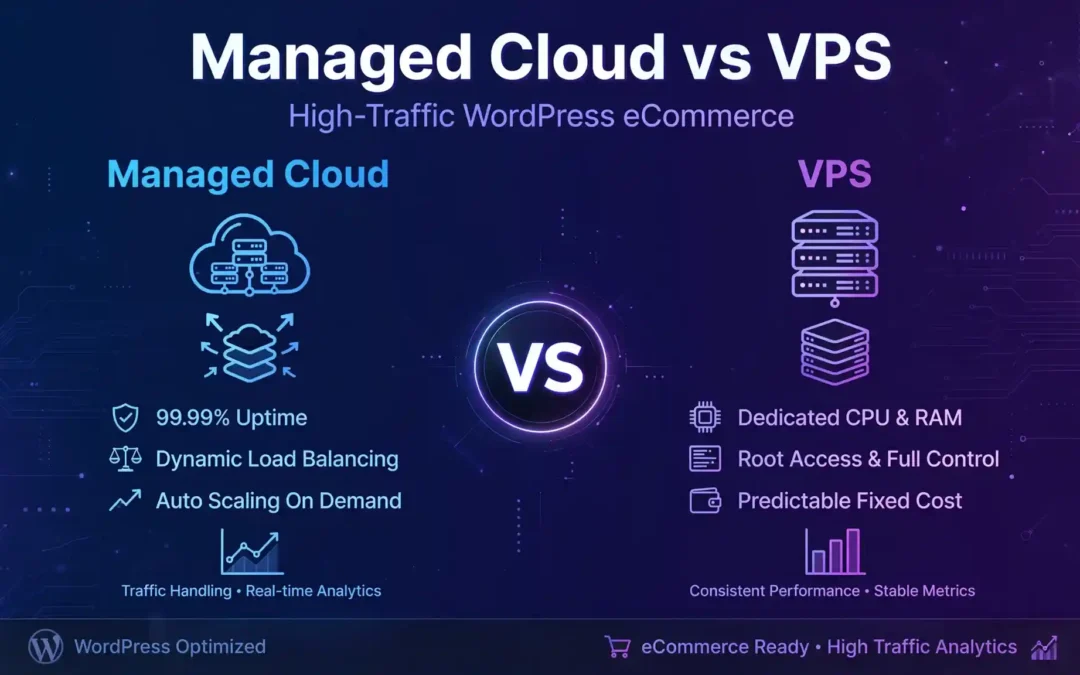
Managed Cloud vs VPS: Which Hosting Is Best for High-Traffic WordPress and E-commerce Sites?
A growing website can turn a good hosting decision into a business advantage—or expose the weaknesses of an infrastructure that was never designed for the traffic it receives. If your WordPress site, WooCommerce store or Node.js application is attracting more visitors, choosing between managed cloud hosting and a virtual private server (VPS) deserves careful consideration.
The right choice depends on more than server specifications. You need to consider traffic spikes, database performance, backups, security, deployment workflows, engineering resources and the cost of downtime.
This guide compares both approaches, explains realistic costs and performance targets, and shows when upgrading your architecture makes financial sense.
Quick answer: Managed cloud or VPS?
Choose managed cloud hosting if revenue depends on availability, you need hands-on operational support, or your team cannot dedicate time to server administration.
Choose a self-managed VPS if you have Linux and DevOps expertise, need root access, want precise control over your stack, and can manage patching, monitoring, backups and recovery.
For a high-traffic store, the strongest solution may combine managed application operations with scalable cloud infrastructure, a CDN, a persistent object cache and a properly sized database.
Managed Cloud vs VPS: Pricing Comparison
The cheapest server is not always the cheapest production environment. Compare the full operating cost, including backups, monitoring, support, security, bandwidth and the engineering time required to keep everything running.
| Cost category | Self-managed VPS | Managed cloud |
|---|---|---|
| Entry-level infrastructure | $5–$50 | $30–$100 |
| Growing business workload | $50–$200 | $100–$400 |
| High-traffic production setup | $200–$800+ | $300–$1,500+ |
| Server administration | Managed internally or outsourced | Often included to a defined scope |
| Scaling and redundancy | Additional engineering and infrastructure | May be available as managed services or add-ons |
Planning ranges only—not verified market averages, vendor quotations or equivalent configurations. Actual costs vary by provider, region, memory, CPU, storage, bandwidth, database size, support tier and redundancy. Managed WordPress plans can cost more than the ranges shown. Confirm current pricing before purchasing.
For a transparent VPS reference, AWS Lightsail's official pricing page lists entry-level Linux virtual servers from $5 per month, with larger bundles at higher prices. That entry price is not a like-for-like comparison with a production-ready managed e-commerce platform.
Pros and Cons at a Glance
Managed Cloud Hosting
Advantages
- Less routine server administration.
- Managed backups and support may be included.
- Scaling options can simplify traffic growth.
- Useful for teams focused on products and sales.
Trade-offs
- Higher recurring cost in many configurations.
- Root access and customisation may be limited.
- Plan limits, support scope and add-ons need checking.
Self-Managed VPS
Advantages
- Greater operating-system and runtime control.
- Flexible deployment and tuning.
- Can offer excellent value for experienced teams.
- Works well for custom Node.js architectures.
Trade-offs
- Your team owns patching and incident response.
- Backups and recovery need deliberate planning.
- Traffic spikes can overwhelm a single server.
1. What Is the Difference Between Managed Cloud and VPS Hosting?
A VPS is a virtual server with an allocated share of computing resources. You typically control its operating system, software, web server and application configuration. The level of isolation and the guarantees around CPU, memory and storage depend on the provider.
Managed cloud hosting adds an operational service layer. Depending on the plan, the provider may handle server maintenance, security updates, backups, monitoring, performance tuning and technical support. Some services also offer staging, automated deployments, managed databases or scaling tools.
The important detail is that managed cloud is not a single standardised server type. A managed cloud platform can run on virtual machines, containers or other cloud infrastructure. A managed VPS is also possible.
| Feature | Managed cloud | Self-managed VPS |
|---|---|---|
| Server maintenance | Provider-managed within contract scope | Your responsibility |
| Root access | Depends on platform | Usually available |
| Backups | May be included or chargeable | You configure and verify them |
| Application deployment | Platform-dependent tools | Full control over your pipeline |
| Scaling | May include guided or automated options | Requires your own design and operation |
| Technical support | Depends on the purchased tier | Usually infrastructure-level support |
Before selecting a service, read the terms carefully. Managed hosting does not automatically mean unlimited traffic, automatic failover, zero downtime or complete protection against every security incident.
2. How the Two Hosting Architectures Work
Managed cloud architecture
A typical production environment might include a CDN, a managed application server, a separate database, object storage for uploads and automated backups. Some providers bundle several of these components; others charge for each service independently.
When traffic rises, the platform may allow vertical scaling, additional application instances or integration with a load balancer. Whether this happens automatically depends on the service and its configuration.
Self-managed VPS architecture
With a VPS, your team chooses how the components fit together. You might configure Nginx, PHP-FPM, MariaDB or MySQL, Redis, firewall rules, monitoring and scheduled backups. For a Node.js service, the stack may instead include a reverse proxy, a Node.js process manager or container runtime, and a separate database.
This flexibility is valuable when you need custom software or have strong infrastructure expertise. It also means your team must plan patching, resource limits, log rotation, recovery procedures and capacity upgrades.
3. Performance: TTFB, LCP and INP Matter More Than Marketing Claims
A powerful server does not automatically make every page fast. An unoptimised product catalogue, a slow database query, a large hero image or excessive JavaScript can undermine an otherwise capable infrastructure.
Evaluate performance at two levels: server response and the experience visitors actually receive.
| Metric | Target | What it tells you |
|---|---|---|
| TTFB | About 0.8 seconds or less | How quickly the browser receives the first response byte. |
| LCP | 2.5 seconds or less | When the main visible content finishes rendering. |
| INP | 200 milliseconds or less | How responsive the page feels to user interactions. |
| CLS | 0.1 or less | How stable the layout remains while loading and interacting. |
LCP, INP and CLS are Google's Core Web Vitals. The 0.8-second TTFB figure is a commonly used good-response guideline, not a Core Web Vital. These are targets, not measurements of either hosting category. Core Web Vitals should be assessed at the 75th percentile of real-user visits, segmented by mobile and desktop.
Read the official Core Web Vitals guidance from Google for current metric definitions and thresholds.
How to benchmark hosting properly
Do not publish a statement such as “managed cloud is 40% faster than VPS” unless you have a documented, repeatable test that supports it. A meaningful comparison needs the same application, dataset, region, caching rules and workload.
- Deploy the same application version to both environments.
- Use equivalent CPU, memory, storage and database configurations where possible.
- Warm caches consistently before measured runs.
- Test anonymous page views and cache-bypassing transactions separately.
- Increase concurrency gradually, then test a realistic traffic spike.
- Record p50 and p95 response times, throughput, errors, CPU, memory and database latency.
- Repeat the test and document the configuration and date.
Tools such as Grafana k6 can generate repeatable load. Combine the results with real-user measurements from PageSpeed Insights or Chrome User Experience Report data where available.
For a US audience, a server in US-East (N. Virginia) may be a sensible starting point when most customers are on the US East Coast. US-West (Oregon) may suit western audiences. For UK traffic, consider London; Frankfurt can be useful for parts of continental Europe. The best region is the one that fits customer geography, data residency requirements and the rest of the application's dependencies.
4. Best Hosting for High-Traffic WordPress and WooCommerce
WordPress and WooCommerce can run effectively on either managed cloud infrastructure or a VPS. The right choice depends on how much of the workload can be cached and how much traffic requires live application and database processing.
When managed cloud is a strong fit
- Your store generates revenue throughout the day and downtime is expensive.
- Your team needs reliable backups, staging and defined support arrangements.
- Promotional campaigns cause sharp traffic spikes.
- You would rather invest engineering time in product development than server maintenance.
When a VPS makes sense
- You have the skills to manage Linux, web servers, databases and security.
- Your workload is understood and resource usage is predictable.
- You need specific server modules or custom configuration.
- You have tested recovery and can respond to incidents promptly.
WooCommerce needs special attention
A product page may be cacheable for anonymous visitors, but a cart, checkout, account page or personalised price often needs dynamic processing. Caching these pages incorrectly can create stale data or expose another user's information.
A resilient store should use carefully configured page caching, persistent object caching where appropriate, database optimisation, a CDN for static assets, image compression and tested backups. Checkout, payment callbacks and inventory updates should be tested under realistic load.
If your website also needs design or implementation work, explore DigitalMindsWeb's website design and development services and its WordPress and web development expertise.
5. What About Node.js Applications?
Node.js changes the deployment requirements, but it does not automatically make one hosting model superior. A Node.js application may serve an API, power a storefront, process background jobs or provide real-time features. Each workload has different resource and availability requirements.
Node.js on a VPS
A VPS gives experienced developers control over the Node.js runtime, process management, reverse proxy, firewall and deployment pipeline. You can use a process manager or containers, configure health checks and tune application resources.
You must also handle runtime upgrades, process crashes, memory leaks, log management, secrets, security patches and restart behaviour. A single VPS can still be a single point of failure even when the application itself is well written.
Node.js on managed cloud infrastructure
A suitable managed platform may provide deployment workflows, health checks, logs, metrics, managed TLS, scaling options and integration with a managed database. These features reduce operational work, but confirm which are actually included.
For higher availability, consider running multiple application instances behind a load balancer, keeping session state outside individual processes, using a shared cache when appropriate and moving long-running jobs into background workers.
| Requirement | Single VPS | Managed or multi-instance cloud |
|---|---|---|
| Runtime control | High | Depends on platform |
| Process recovery | You configure and test it | May be built into the service |
| Horizontal scaling | Requires additional design | May be supported by the platform |
| High availability | Requires additional infrastructure | Requires suitable multi-instance configuration |
| Operational workload | Higher internal responsibility | Potentially lower, subject to service scope |
One important architecture rule: do not store sessions, uploaded files or other essential shared state only on a single application instance if requests may move between instances. Use suitable shared services or persistent storage.
For a custom application, hosting selection should follow a capacity and reliability assessment rather than a blanket assumption that Node.js always needs a large cloud cluster.
6. Security, Compliance and Disaster Recovery
Security responsibilities do not disappear when you pay for managed hosting. A provider may maintain the underlying infrastructure while you remain responsible for application vulnerabilities, user permissions, plugin updates, secrets and data handling.
Evaluate these safeguards
- Patch management: clarify which operating-system, runtime and application updates are handled by the provider.
- Backups: check frequency, retention, geographic location and restoration charges.
- Recovery objectives: establish recovery time objectives (RTO) and recovery point objectives (RPO).
- Access control: require MFA, least-privilege access and secure credential storage.
- Monitoring: track application errors, unusual traffic, resource exhaustion and database health.
- Incident response: document escalation routes and the responsibilities of both parties.
US and UK compliance considerations
GDPR may apply to personal data processing involving people in the UK or European Economic Area, depending on the organisation and processing activities. UK GDPR and the Data Protection Act 2018 are relevant to many UK businesses. CCPA, as amended by the CPRA, may apply to qualifying businesses handling California residents' personal information.
HIPAA applies to covered entities and business associates in relevant healthcare contexts; it is not a general requirement for every website. SOC 2 is an attestation framework for service organisations, not a universal legal certification or a guarantee that a particular application is secure.
When these requirements are relevant, review the provider's contractual commitments, security documentation, subprocessors, audit reports, data-processing terms and available regional controls. Choosing a London or US-East server alone does not establish compliance.
DigitalMindsWeb also provides information about its digital services. For a project-specific discussion of website maintenance, security and architecture, use the contact page.
7. Scaling for Traffic Spikes Without Overspending
A website receiving 100,000 visits per month does not necessarily need the same infrastructure as another website with the same traffic. One may serve mostly cached articles; the other may process product searches, logged-in dashboards and thousands of concurrent checkout requests.
Plan capacity around requests per second, concurrency, response-time objectives and the cost of failed requests—not monthly visits alone.
A practical scaling sequence
- Measure first. Identify slow endpoints, database bottlenecks and memory pressure.
- Optimise the application. Reduce unnecessary database queries, oversized responses and expensive third-party calls.
- Cache safely. Cache public content and static assets while protecting personalised data and transactions.
- Scale vertically. Add CPU and memory if tests demonstrate that the workload benefits from them.
- Scale horizontally. Add application instances when the architecture and workload support it.
- Protect dependencies. Check database connections, queue capacity, API rate limits and storage throughput.
- Test failure scenarios. Verify what happens when an instance, database connection or external service becomes unavailable.
Cloud architecture does not guarantee automatic scaling. Scaling policies need thresholds, limits, sufficient capacity and load tests. A database may become the bottleneck even when application instances scale successfully.
AWS explains this approach in its guidance on benchmarking to guide architecture decisions. The key principle is to use evidence from your own workload rather than relying only on generic benchmarks.
8. Calculate the Real Total Cost of Ownership
Comparing a $25 VPS with a $150 managed plan is incomplete if the VPS requires regular engineering work, additional backup storage and paid incident response.
Calculate the monthly cost using this formula:
Total monthly cost =
Infrastructure + managed services + backups + monitoring + CDN and bandwidth + security tools + engineering hours + expected incident costs
Consider this illustrative scenario for a growing e-commerce business:
| Expense | VPS model | Managed model |
|---|---|---|
| Hosting infrastructure | $100 | $250 |
| Backup and monitoring tools | $35 | $25 |
| Engineering administration | 6 hours × $75 = $450 | 1 hour × $75 = $75 |
| Illustrative monthly total | $585 | $350 |
This is a hypothetical cost model, not a survey or a vendor quote. It assumes the stated engineering hours and hourly rate; it excludes taxes, migration, extra capacity, payment-processing fees and incident losses. Real managed plans may charge more for backups, monitoring or support.
In this example, the managed option costs more for infrastructure but less overall because it reduces administration. If your team already has reliable automation and operational expertise, the VPS option may be more economical.
9. Which Hosting Option Should You Choose?
Choose managed cloud if…
- Your store is business-critical.
- You need a defined support arrangement.
- You want to minimise server maintenance.
- You need a path to multi-instance scaling.
Choose a VPS if…
- Your team has strong Linux and DevOps skills.
- You need root access or custom software.
- You can maintain tested backups and recovery.
- Your workload benefits from direct tuning.
Recommendations by business scenario
| Scenario | Suggested starting point | Priority |
|---|---|---|
| Small content website | Managed WordPress or a modest VPS | Low maintenance and caching |
| Growing WooCommerce store | Managed cloud with suitable database and backup options | Checkout reliability |
| Custom Node.js API | Managed application platform or expertly managed VPS | Deployment and observability |
| High-concurrency application | Load-tested, multi-instance architecture where required | Capacity and resilience |
| Regulated workload | Provider and architecture assessed against applicable requirements | Security and governance |
Before migrating, benchmark the existing website and identify the actual bottleneck. Moving to a more expensive hosting tier will not fix every slow query, oversized image or inefficient application workflow.
Further Reading from DigitalMindsWeb
Explore these existing resources for related business technology, software selection and web development topics.
The links above point to URLs found on the live site. Some existing articles cover adjacent business technology topics rather than hosting directly. For a stronger topical cluster, publish supporting articles on WooCommerce performance, VPS security, Node.js deployment and cloud hosting costs, then add contextual links between those pages.
Frequently Asked Questions
Is managed cloud hosting better than VPS hosting?
Neither is universally better. Managed cloud is often preferable when operational support and reduced maintenance are priorities. A self-managed VPS is a strong option for teams that need control and have the skills to operate the infrastructure.
Can a VPS handle high traffic?
Yes. A properly configured VPS can handle substantial traffic when the application, caching and database are optimised. Its capacity must be verified through load testing, and a single VPS may need additional infrastructure to meet strict availability requirements.
Is managed cloud hosting worth the extra cost for WooCommerce?
It can be worthwhile if the service reduces administration, provides useful support and helps protect a revenue-critical store. Compare the actual support scope, backup restoration, performance and total operating cost before deciding.
Which is better for Node.js: managed cloud or VPS?
Managed cloud can simplify deployments, monitoring and scaling when those features are included. A VPS gives developers more control but requires them to manage runtime updates, process recovery, security and capacity.
Will changing hosting automatically improve Core Web Vitals?
No. Hosting can affect server response time, but LCP and INP also depend on images, CSS, JavaScript, caching, third-party code and application behaviour. Measure real-user performance before and after migration.
How much should I budget for high-traffic hosting?
Costs depend on resource requirements, database architecture, traffic patterns, support and redundancy. Use provider quotations and a workload-specific cost model rather than relying on generic monthly price ranges.
Should my server be located in the US or UK?
Choose a region close to your main users where practical, while considering database location, external dependencies, data residency and compliance obligations. A CDN can help deliver static content to users in other regions.
How can I prove that a hosting setup is ready for a traffic spike?
Run repeatable load tests with realistic user journeys. Record throughput, p95 latency, errors, CPU, memory and database behaviour. Establish a safe operating threshold and verify that recovery procedures work before major campaigns.
Planning a Faster, More Scalable Website?
The best infrastructure is the one that meets your performance, security and availability requirements without adding unnecessary operational cost. Start with evidence from your current workload, then choose the architecture that fits your team and growth plans.
Trackbacks/Pingbacks