
The Complete Guide to Choosing Small Business Web Hosting: Shared vs VPS vs Cloud
Your web hosting determines far more than where your website files live. It affects page speed,
reliability, security, scalability, maintenance workload, and how smoothly your website handles
traffic as your business grows. For most small businesses, the real decision comes down to three
hosting models: shared hosting, VPS hosting, and cloud hosting.
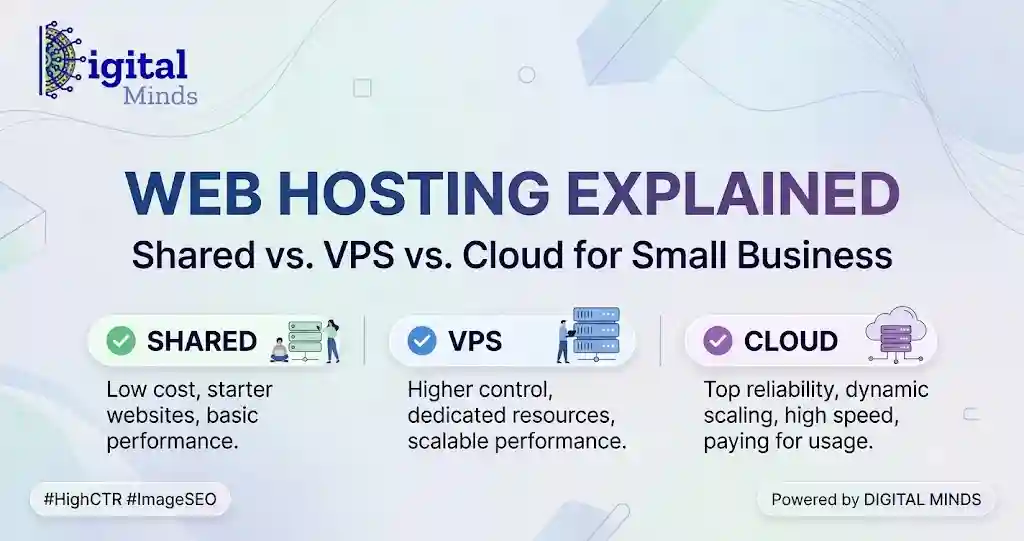
Shared hosting is usually the simplest and most economical option for smaller,
low-traffic business websites. VPS hosting provides dedicated portions of server
resources and greater control, making it suitable for growing websites and applications.
Cloud hosting distributes workloads across cloud infrastructure and is generally
the most flexible choice when uptime, traffic changes, and scalability are priorities.
What Does Web Hosting Actually Do for a Small Business?
A website is made up of files, databases, images, code, and other resources. Web hosting provides
the computing infrastructure that stores those resources and delivers them when someone visits
your domain.
When a customer opens your website, the hosting server processes the request, retrieves the
necessary data, and sends the page back to the visitor’s browser. The quality and configuration
of that infrastructure can influence how quickly and reliably this happens.
This is why choosing hosting should not be based only on the lowest advertised monthly price.
A business website also needs enough processing power, memory, storage, bandwidth, security,
backups, and technical support for its workload.
your domain is your website’s address, your website is the business premises, and hosting is
the land and infrastructure supporting it. Better infrastructure gives the website more room
to operate and grow.
What Is VPS Hosting?
VPS stands for Virtual Private Server. Instead of simply placing many websites
inside one traditional shared hosting environment, virtualization software divides a physical
server into separate virtual server environments.
Each VPS can have its own allocated processing capacity, RAM, storage, operating environment,
and configuration. You are still using hardware that may physically serve other customers,
but your virtual environment is significantly more isolated than standard shared hosting.
Who is VPS hosting best for?
- Growing WordPress websites
- Busy WooCommerce stores
- Membership and learning websites
- Web applications with specific server requirements
- Businesses requiring more predictable resources
- Developers who need greater server configuration control
Managed vs unmanaged VPS hosting
This distinction is important.
With an unmanaged VPS, the customer may be responsible for tasks such as
configuring the server, installing updates, securing services, monitoring performance, and
troubleshooting operating-system-level problems.
A managed VPS shifts more of those responsibilities to the hosting provider.
The exact management scope varies from company to company, so always check what is actually
included before buying.
A low-cost unmanaged VPS and a fully managed VPS are different products even when their CPU,
RAM, and storage specifications look similar.
What Is Cloud Hosting?
Cloud hosting uses cloud computing infrastructure instead of depending entirely on the resources
of one traditional server. Depending on the provider and architecture, computing, storage,
networking, and other services may operate across a pool or cluster of underlying infrastructure.
The biggest practical benefit is flexibility. Resources can often be increased or decreased more
easily than with traditional fixed-server hosting. Well-designed cloud architectures can also
reduce dependence on a single physical machine.
Who is cloud hosting best for?
- Websites with changing or unpredictable traffic
- Growing online stores
- SaaS products and web applications
- Businesses where availability is especially important
- Projects that may require rapid scaling
- Businesses expecting infrastructure needs to change over time
Does cloud hosting automatically mean faster hosting?
No. Cloud hosting describes an infrastructure model; it does not automatically guarantee a
fast website.
Performance still depends on factors such as the resources assigned to your account, server
software, database configuration, caching, content delivery, website code, WordPress theme,
plugins, image sizes, and geographical distance between visitors and infrastructure.
A well-optimized VPS can outperform a poorly configured cloud server. Likewise, a carefully
optimized shared hosting plan can be perfectly adequate for a small site.
Shared vs VPS vs Cloud Hosting: Side-by-Side Comparison
| Factor | Shared Hosting | VPS Hosting | Cloud Hosting |
|---|---|---|---|
| Typical cost | Lowest | Moderate | Varies widely |
| Resource isolation | Limited | Higher | Depends on cloud service |
| Scalability | Limited to plan/provider options | Good | Usually strongest |
| Server control | Low | High on many VPS plans | Ranges from simple to very advanced |
| Technical knowledge required | Low | Medium to high if unmanaged | Depends heavily on platform |
| Best suited to | Small and simpler websites | Growing or resource-intensive websites | Scalable and changing workloads |
| Infrastructure flexibility | Low | Medium | High |
Shared
Choose simplicity
Suitable when your website is relatively small, your workload is predictable, and keeping
hosting simple and economical matters most.
VPS
Choose more control
Suitable when your website needs more predictable resources, configuration freedom, or room
to handle heavier workloads.
Cloud
Choose flexibility
Suitable when scalability, changing demand, flexible infrastructure, or resilience are major
priorities.
How Hosting Resources Are Allocated
Hosting advertisements often focus on storage space, but storage is only one part of website
performance. A business owner should understand at least the following resources before choosing
a plan.
CPU
The CPU handles computational work. Dynamic WordPress pages, PHP processes, database operations,
checkout functions, searches, and plugin tasks all consume processing capacity.
RAM
RAM provides working memory for active processes. A website with more simultaneous operations,
plugins, database queries, or application services may require more memory.
Storage
Storage holds website files, databases, email data where applicable, backups, logs, and media.
Capacity matters, but storage performance matters too. Modern SSD or NVMe-based storage can
provide faster data access than older mechanical storage.
Bandwidth and data transfer
Data transfer describes how much information moves between your hosting infrastructure and
visitors over a period of time. Image-heavy websites, downloads, video delivery, and high traffic
can increase transfer requirements.
PHP workers and concurrent processes
On managed WordPress platforms, you may also encounter terms such as PHP workers or concurrent
requests. These can affect how many uncached dynamic requests the website can process at the same
time.
There is no universally correct amount of CPU, RAM, or bandwidth for a “small business
website.” A five-page local business website and a WooCommerce store receiving hundreds of
simultaneous visitors are both small-business websites, but their infrastructure requirements
can be dramatically different.
Shared vs VPS vs Cloud: Understanding the Real Cost
Hosting cost should be evaluated as total operating cost, not simply the
introductory monthly fee shown on a pricing page.
For example, a hosting plan may require you to pay separately for backups, malware protection,
email hosting, a control panel, CDN services, premium support, additional storage, or server
administration.
Shared hosting cost structure
Shared hosting normally has a predictable subscription price. This is convenient for businesses
that want straightforward budgeting, although introductory promotions may differ from renewal
pricing.
VPS hosting cost structure
VPS pricing usually depends on the CPU, RAM, storage, bandwidth, management level, control panel,
and backup options selected. Managed VPS hosting generally costs more than comparable unmanaged
infrastructure because administration is included.
Cloud hosting cost structure
Cloud pricing can be either fixed or usage-based. Infrastructure-focused cloud platforms may
charge separately for computing, storage, network transfer, database services, snapshots, and
other resources.
This flexibility is valuable, but it also means cloud hosting is not automatically the cheapest
option.
What Matters More Than the Hosting Label?
Terms such as “cloud,” “VPS,” and “premium hosting” describe only part of the service. Two plans
carrying the same label can deliver very different real-world experiences.
Before choosing a provider, compare:
- CPU and memory limits
- Storage technology and capacity
- Backup frequency and restoration options
- Data-centre or server locations
- CDN and caching availability
- Security monitoring and malware policies
- SSL certificate support
- WordPress-specific optimisation where relevant
- Technical support scope and availability
- Upgrade and downgrade options
- Migration assistance
- Renewal price, not just introductory pricing
How Hosting Can Affect Website Speed and Core Web Vitals
Hosting can influence server response performance, but it is only one piece of the page-speed
puzzle.
Largest Contentful Paint (LCP), for example, can be influenced by server response
time as well as caching, image optimisation, CSS, fonts, browser rendering, the WordPress theme,
and the size of the largest visible content element.
Moving to a larger server will not fix an oversized hero image, excessive JavaScript, unoptimized
fonts, or a poorly built page.
For a fast WordPress website, combine appropriate hosting with lightweight design, page caching,
optimized images, limited third-party scripts, efficient plugins, and a CDN where useful.
the layout uses system/theme typography, lightweight CSS, semantic HTML, and no JavaScript
dependency for presentation.
How to Choose the Right Hosting for Your Small Business
Instead of asking, “Which hosting type is best?”, ask, “Which hosting type matches the workload
and operational needs of this website?”
Start with the type of website
A five-page company website has different requirements from WooCommerce, a membership
website, an LMS, or a custom web application.
Estimate traffic and workload
Consider normal traffic as well as periods when advertising campaigns, product launches,
seasonal demand, or viral content could create traffic spikes.
Identify dynamic features
Shopping carts, logged-in users, searches, dashboards, memberships, booking systems, APIs,
and personalized content can consume more resources than simple cached pages.
Decide how much technical management you want
If your company does not have server expertise, managed hosting can be more practical than
buying inexpensive infrastructure that your team cannot maintain securely.
Plan for growth
Your first hosting plan does not need to support every possible future scenario, but you
should understand how easily you can upgrade when the website grows.
Compare total cost
Include renewals, backups, security tools, CDN services, email, server management, premium
support, and additional resources when comparing providers.
Which Hosting Type Fits Different Small Businesses?
| Business website | Common starting point | Reason |
|---|---|---|
| Local service website | Shared or managed WordPress hosting | Usually modest workload and relatively predictable traffic |
| Professional services website | Shared or managed hosting | Primarily informational pages and lead generation |
| Growing content website | Managed hosting or VPS | Additional resources may help as traffic and database size increase |
| WooCommerce store | Managed cloud hosting or VPS | Checkout, account pages, carts, and database activity create dynamic workloads |
| Membership or LMS website | VPS or cloud hosting | Logged-in users reduce the effectiveness of full-page caching |
| SaaS or custom application | VPS or cloud infrastructure | Greater control and scalability are often required |
These are starting points rather than rigid rules. Actual requirements depend on the site’s code,
traffic, database activity, caching strategy, plugins, integrations, and business priorities.
When Should You Upgrade Your Hosting?
A business does not necessarily need VPS or cloud hosting on day one. Upgrading makes more sense
when the existing environment begins limiting performance, reliability, functionality, or growth.
Possible signs include:
- Regular CPU or memory limit warnings
- Slow server response despite proper website optimization
- Performance problems during predictable traffic peaks
- Frequent resource-related errors
- A growing WooCommerce, membership, or LMS workload
- The need for custom server software or configurations
- Business growth that makes stronger isolation or scalability more valuable
Before upgrading, diagnose the cause of poor performance. A badly optimized database, broken
plugin, oversized images, or excessive scripts should not automatically be treated as a hosting
problem.
Shared Hosting vs VPS vs Cloud: The Simplest Decision Framework
Choose shared hosting when affordability, simplicity, and ease of management
are more important than dedicated resources or server-level control.
Choose VPS hosting when you need stronger resource isolation, more predictable
capacity, custom configuration, or additional processing power.
Choose cloud hosting when your priority is flexible infrastructure, easier
scaling, changing workloads, or an architecture that can extend beyond a single traditional
server.
The important point is that “more powerful” is not automatically “better.” Paying for infrastructure
your website does not use creates unnecessary cost, while choosing hosting that is too limited
can create performance problems and force an early migration.
Frequently Asked Questions About Small Business Web Hosting
What type of hosting is best for a small business website?
It depends on the website. A simple local or informational business website can often begin
with quality shared or managed WordPress hosting. Growing stores, membership sites, and
resource-intensive websites may benefit from VPS or cloud hosting.
Is VPS hosting faster than shared hosting?
A VPS usually provides greater resource isolation and can provide more processing capacity,
but it is not automatically faster. Website code, caching, database configuration, server
software, images, plugins, and other factors also affect performance.
Is cloud hosting better than VPS hosting?
Neither is universally better. VPS hosting can be suitable when a business needs predictable
allocated resources and server control. Cloud hosting can be preferable when flexible scaling
and distributed infrastructure are more important.
Can a small business start with shared hosting and upgrade later?
Yes. Many businesses can begin with shared hosting and migrate to a VPS, managed platform,
or cloud environment when traffic, features, or resource requirements increase. Check a
provider’s migration and upgrade options before committing.
How much RAM does a small business website need?
There is no single RAM requirement for every small business website. A small informational
site may need very little memory, while WooCommerce, membership sites, learning platforms,
and custom applications can require significantly more resources.
Does better hosting improve SEO?
Hosting is not a substitute for good SEO. However, infrastructure can affect website speed,
availability, security, and user experience. Appropriate hosting combined with good technical
optimization can support a healthier website overall.
What should I check before buying web hosting?
Review resource limits, backups, storage, server locations, security features, SSL support,
CDN availability, support quality, migration assistance, scalability, renewal pricing, and
exactly what the provider manages for you.
What is managed hosting?
Managed hosting is a service where the provider handles some or much of the technical
administration of the hosting environment. The exact responsibilities vary, so businesses
should check whether management includes updates, monitoring, backups, security, optimization,
and application support.
The Bottom Line
Shared, VPS, and cloud hosting solve different problems. Shared hosting emphasizes simplicity and
affordability. VPS hosting provides stronger resource isolation and control. Cloud hosting
emphasizes flexibility and scalability.
For a small business, the right choice is the hosting environment that comfortably supports the
website you operate today while giving you a practical path to grow tomorrow. Evaluate the
workload, resources, management requirements, performance needs, upgrade options, and total cost
before making the decision.
Not sure whether your small business needs shared, VPS or cloud hosting? This guide explains how each hosting model allocates resources, what each one costs, when to upgrade, and which workloads each option is designed to handle.